Tip 1/5

    Search is your shortcut

    Press ⌘K to search anything

    PM
    PM101

    PM101

    PM101
    Solution Guide

    The project management platform for small teams: the skills, templates and AI-powered tools to run projects properly, without enterprise overhead.

    For every PM. Accidental or not. · pm101.co.uk

    Contents

    What’s inside

    1. 01IntroductionWhy small teams need a different kind of PM platform
    2. 02FeaturesGuided setup, delivery workspace, portfolio visibility
    3. 03AIThe Context Engine, the assistant, agents and scenarios
    4. 04The PlatformEvery tool in PM101, and what each one is for

    PM101 · Solution Guide · Ask it. Run it. Pocket it.

    Solution Guide

    PM101 Solution Guide

    The project management platform for small teams: the skills, templates and AI-powered tools to run projects properly, without enterprise overhead.

    For every PM. Accidental or not.

    Start free
    01

    Introduction

    Small businesses run projects constantly: office moves, system rollouts, product launches, client work. Most of the people running them were never trained as project managers, and there's no PMO to fall back on.

    PM101 exists to close that gap.

    Run projects properly, without the overhead

    In most small and mid-sized businesses, projects are run on instinct. Plans live in spreadsheets, updates live in email chains, and every project feels like starting from scratch. Deadlines slip, budgets drift, and nobody's quite sure what good looks like.

    The people running these projects are rarely career project managers. They're founders, operations managers and team leads who've been handed a project alongside the day job. Formal training is expensive and academic. Enterprise PM tools are overkill for a team of ten. And generic AI gives you raw output with none of the method behind it.

    That's where PM101 comes in: a project management learning and tools platform built for SMEs. It combines plain-English learning, ready-to-use templates, a library of expert-written AI prompts, and a full project planning tool in one place, so small teams can run projects with the confidence of a much bigger organisation.

    You don't need to learn a methodology before you can be productive. You start doing, and the learning happens alongside the work.

    Built for real businesses

    Every template, lesson and tool is calibrated for teams of 5 to 50, not scaled-down enterprise. No 40-page methodology documents. No jargon. Everything is sized for a business where the person running the project also has a day job.

    AI-native from day one

    AI isn't bolted on; it's baked in. Prompts come pre-loaded with PM best practice, so the output is useful first time, not after an hour of rewriting. And the more you feed it, the better it gets.

    What is PM101

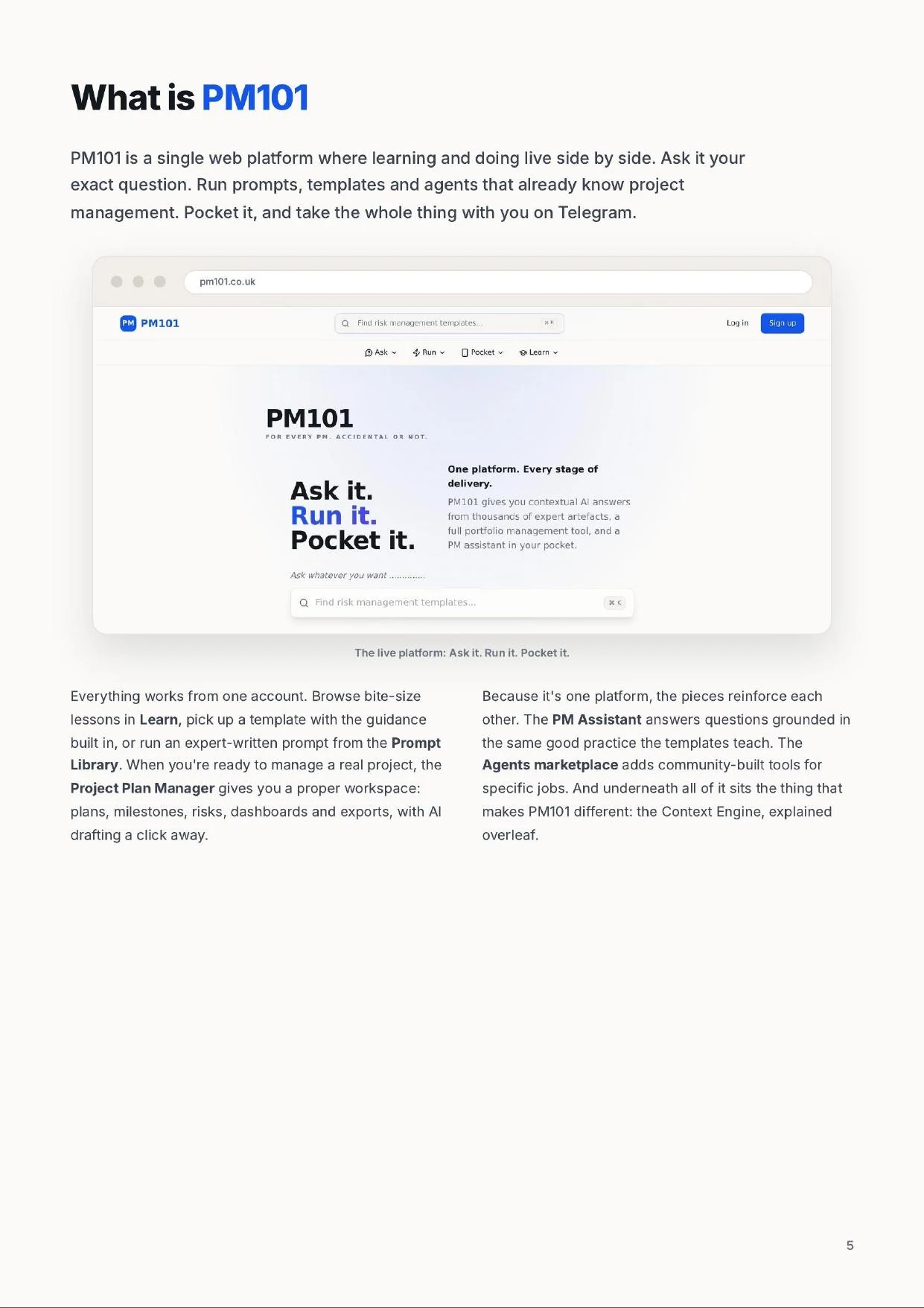
    PM101 is a single web platform where learning and doing live side by side. Ask it your exact question. Run prompts, templates and agents that already know project management. Pocket it, and take the whole thing with you on Telegram.

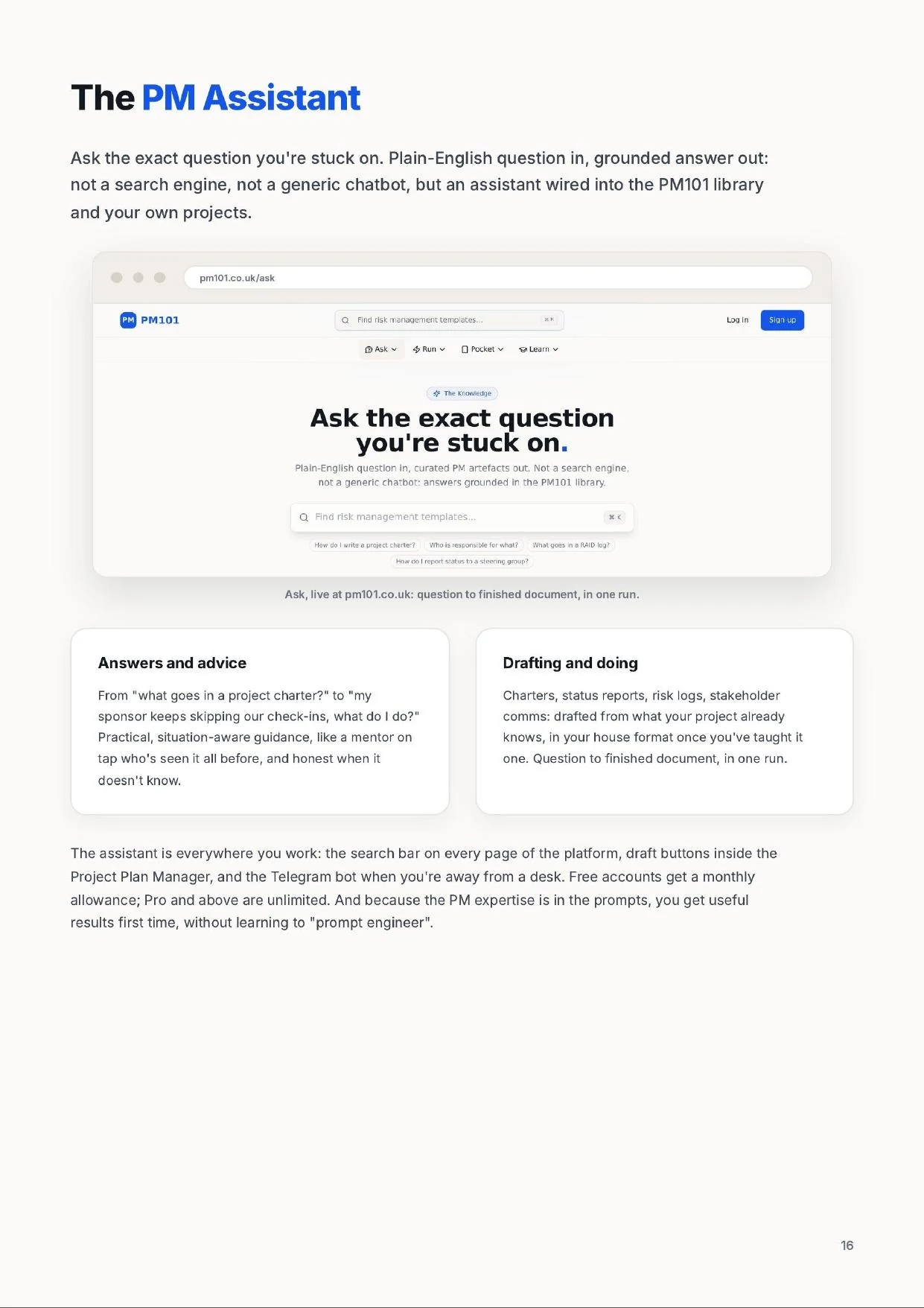
    The PM101 Ask page: a single search box for plain-English project management questions, with suggested questions beneath it.
    The live platform at pm101.co.uk/ask: ask it, run it, pocket it.

    Everything works from one account. Browse bite-size lessons in Learn, pick up a template with the guidance built in, or run an expert-written prompt from the Prompt Library. When you're ready to manage a real project, the Project Plan Manager gives you a proper workspace: plans, milestones, risks, dashboards and exports, with AI drafting a click away.

    Because it's one platform, the pieces reinforce each other. The PM Assistant answers questions grounded in the same good practice the templates teach. The Agents marketplace adds community-built tools for specific jobs. And underneath all of it sits the thing that makes PM101 different: the Context Engine.

    The PM101 difference

    The Context Engine

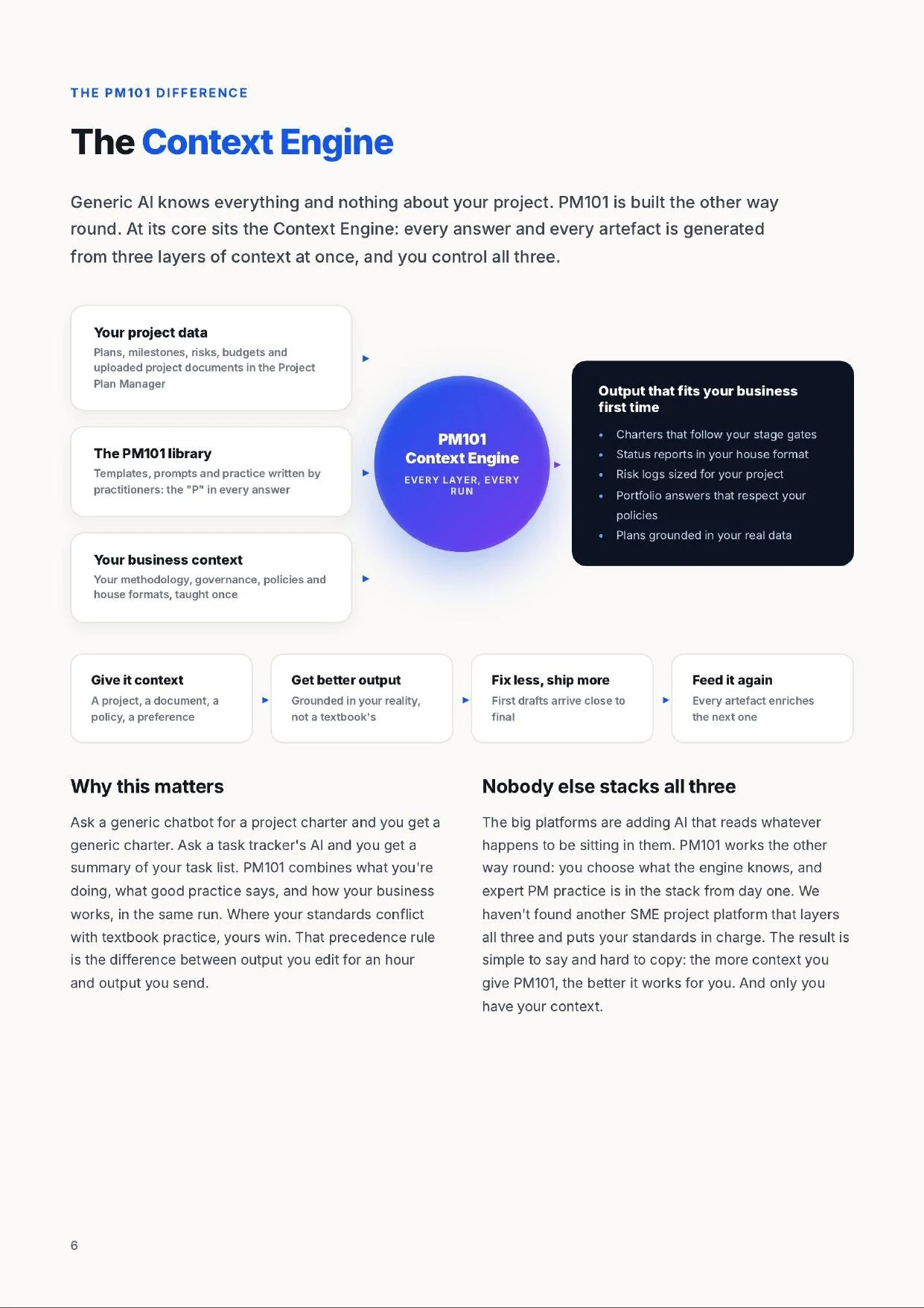
    Generic AI knows everything and nothing about your project. PM101 is built the other way round. At its core sits the Context Engine: every answer and every artefact is generated from three layers of context at once, and you control all three.

    Project DataPlans, milestones, risks, budgets and source documents
    PM101 LibraryPractitioner-written templates, prompts and proven practice
    Business ContextYour governance, policies, methodology and house formats
    PM101 Context EngineThree layers. One grounded answer.
    Business-fit outputUseful first drafts, grounded in your reality
    • Follows your stage gates
    • Uses your house format
    • Reflects live project facts
    1. 1Give it context
    2. 2Get better output
    3. 3Fix less, ship more
    4. 4Feed it again
    Three controlled inputs converge in the Context Engine; every accepted output improves what comes next.

    Why this matters

    Ask a generic chatbot for a project charter and you get a generic charter. Ask a task tracker's AI and you get a summary of your task list. PM101 combines what you're doing, what good practice says, and how your business works, in the same run. Where your standards conflict with textbook practice, yours win. That precedence rule is the difference between output you edit for an hour and output you send.

    Nobody else stacks all three

    The big platforms are adding AI that reads whatever happens to be sitting in them. PM101 works the other way round: you choose what the engine knows, and expert PM practice is in the stack from day one. The result is simple to say and hard to copy: the more context you give PM101, the better it works for you. And only you have your context.

    PM101 pricing

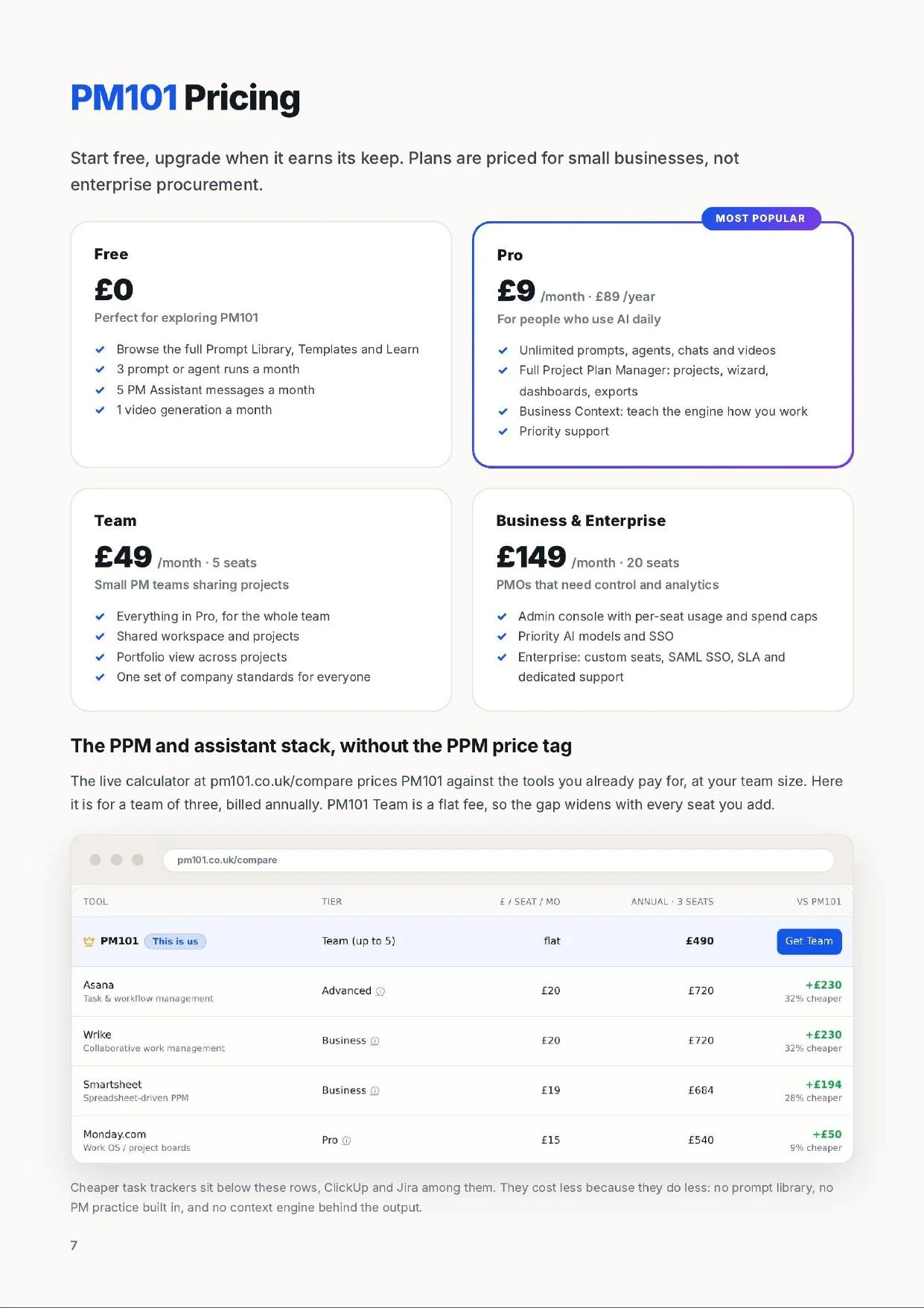
    Start free, upgrade when it earns its keep. Plans are priced for small businesses, not enterprise procurement.

    Free

    £0

    Perfect for exploring PM101

    • Browse the full Prompt Library, Templates and Learn
    • 3 prompt or agent runs a month
    • 5 PM Assistant messages a month
    • 1 video generation a month
    Most popular

    Pro

    £9/month · £89/year

    For people who use AI daily

    • Unlimited prompts, agents, chats and videos
    • Full Project Plan Manager: projects, wizard, dashboards, exports
    • Business Context: teach the engine how you work
    • Priority support

    Team

    £49/month · 5 seats

    Small PM teams sharing projects

    • Everything in Pro, for the whole team
    • Shared workspace and projects
    • Portfolio view across projects
    • One set of company standards for everyone

    Business & Enterprise

    £149/month · 20 seats

    PMOs that need control and analytics

    • Admin console with per-seat usage and spend caps
    • Priority AI models and SSO
    • Enterprise: custom seats, SAML SSO, SLA and dedicated support

    The PPM and assistant stack, without the PPM price tag

    The live comparison tool at pm101.co.uk/compare prices PM101 against Monday, Asana, Jira and MS Project for your team size. A 3-seat team typically saves hundreds of pounds a year, and new capabilities land in every plan as they ship. No per-feature pricing, no surprises.

    02

    Features

    PM101 supports the full life of a project, from "I've just been handed this" through planning and delivery to the final report. Learn what to do, grab the template that does it, and let AI handle the heavy lifting.

    The following sections walk through the four capability areas of the platform: starting well, planning and delivering, staying visible, and working together.

    Feature area A

    Start every project right

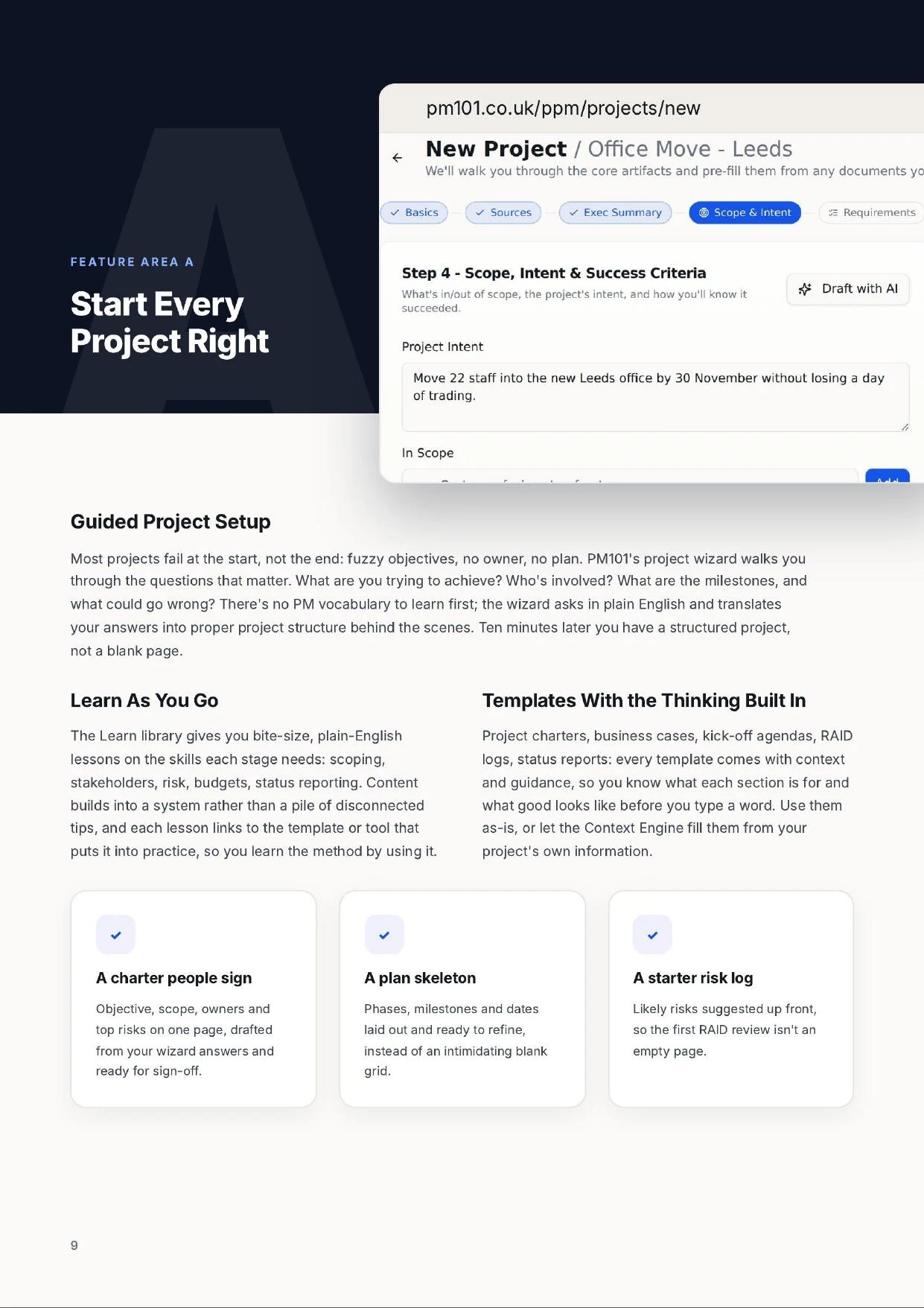
    Guided project setup

    The PM101 new project wizard, step 1 of 7: project name, sponsor, project manager and a short description.
    The project wizard: plain-English questions in, proper project structure out.

    Most projects fail at the start, not the end: fuzzy objectives, no owner, no plan. PM101's project wizard walks you through the questions that matter. What are you trying to achieve? Who's involved? What are the milestones, and what could go wrong? There's no PM vocabulary to learn first; the wizard asks in plain English and translates your answers into proper project structure behind the scenes. Ten minutes later you have a structured project, not a blank page.

    Learn as you go

    The Learn library gives you bite-size, plain-English lessons on the skills each stage needs: scoping, stakeholders, risk, budgets, status reporting. Content builds into a system rather than a pile of disconnected tips, and each lesson links to the template or tool that puts it into practice, so you learn the method by using it.

    Templates with the thinking built in

    Project charters, business cases, kick-off agendas, RAID logs, status reports: every template comes with context and guidance, so you know what each section is for and what good looks like before you type a word. Use them as-is, or let the Context Engine fill them from your project's own information.

    A charter people sign

    Objective, scope, owners and top risks on one page, drafted from your wizard answers and ready for sign-off.

    A plan skeleton

    Phases, milestones and dates laid out and ready to refine, instead of an intimidating blank grid.

    A starter risk log

    Likely risks suggested up front, so the first RAID review isn't an empty page.

    From idea to approved project

    Make the case

    When a project needs sign-off, PM101 helps you build the argument: the problem you're solving, the options considered, expected benefits, costs and risks. The business case template keeps it to the length a busy owner will actually read, and the AI drafts a first version from whatever notes you already have.

    Set the ground rules

    Scope boundaries, assumptions, dependencies and risks get captured before delivery starts, so the awkward conversations happen early and cheaply. Decision-makers see what they're agreeing to; the team knows what's in and what's out.

    Ten minutes with the wizard beats two weeks of "we'll sort the plan out later."

    1. 1

      Capture

      Answer plain-English questions about the project. No PM vocabulary required, no blank-page dread.

    2. 2

      Structure

      PM101 turns your answers into a proper project: objectives, milestones, owners, risks.

    3. 3

      Draft

      Generate the charter, plan and kick-off pack with AI, grounded in your inputs rather than invented.

    4. 4

      Go

      Share it, get the nod, and start delivery with everyone pointing the same way.

    Feature area B

    Plan and deliver

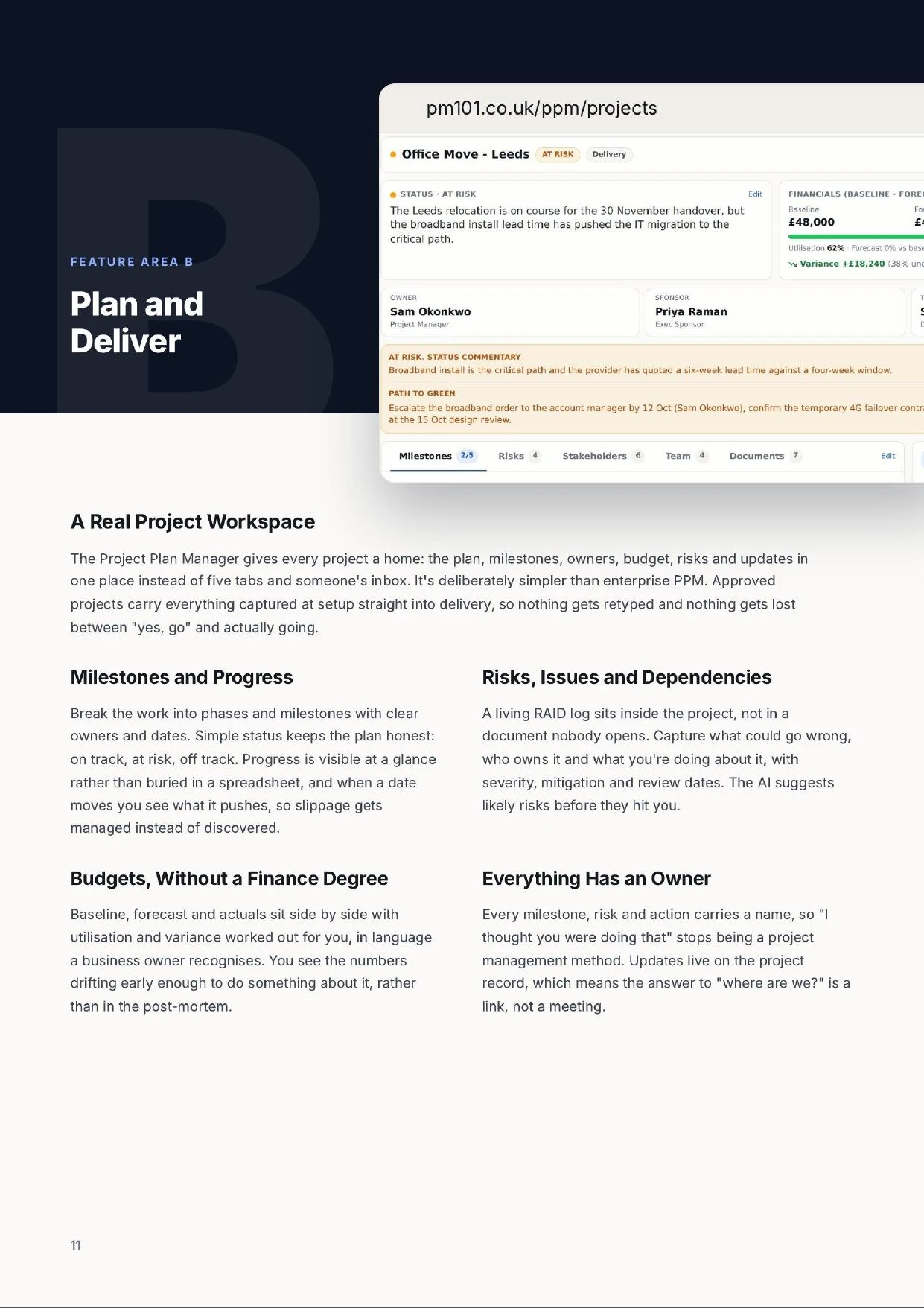
    A real project workspace

    A live PM101 project dashboard showing status, baseline, forecast and actual financials, owner, sponsor, timeline, status commentary and milestones.
    A live project in the Project Plan Manager: status, financials, milestones and risks on one record.

    The Project Plan Manager gives every project a home: the plan, milestones, owners, budget, risks and updates in one place instead of five tabs and someone's inbox. It's deliberately simpler than enterprise PPM. Approved projects carry everything captured at setup straight into delivery, so nothing gets retyped and nothing gets lost between "yes, go" and actually going.

    The PM101 high-level plan view: a monthly timeline with phases, milestone markers and dependency links.
    The high-level plan: phases, milestones and dependencies, extracted from the project record.

    Milestones and progress

    Break the work into phases and milestones with clear owners and dates. Simple status keeps the plan honest: on track, at risk, delayed. Progress is visible at a glance rather than buried in a spreadsheet, and when a date moves you see what it pushes, so slippage gets managed instead of discovered.

    Risks, issues and dependencies

    A living RAID log sits inside the project, not in a document nobody opens. Capture what could go wrong, who owns it and what you're doing about it, with severity, mitigation and review dates. The AI suggests likely risks before they hit you.

    Budgets, without a finance degree

    Track the approved budget against what's actually being spent and committed, in language a business owner recognises. Simple signals show when the numbers are drifting, early enough to do something about it rather than in the post-mortem.

    Everything has an owner

    Every milestone, risk and action carries a name, so "I thought you were doing that" stops being a project management method. Updates live on the project record, which means the answer to "where are we?" is a link, not a meeting.

    Test the plan before reality does

    Scenarios: ask "what if?" safely

    What if the fit-out slips three weeks? What if we lose a key person in March? Scenarios let you apply a "lens" to your plan and see the knock-on effects without touching the live project. Stack lenses, compare outcomes, and promote a scenario to become the plan if it's the better answer.

    Draft with AI, stay in control

    Any section of the project can be drafted by AI from what the project already knows: charter, plan narrative, status commentary. You review and edit; nothing is invented that isn't grounded in your project's information.

    Change without chaos

    Plans change; that's fine. Because scenarios are separate from the live plan, you can explore options in front of stakeholders without anyone panicking about the numbers moving.

    Exports that look the part

    Turn the live plan into shareable, client-ready documents in a click. Share read-only scenario links so stakeholders see exactly what you see. No logins, no attachments.

    Enough structure to deliver consistently, without the process burden, the admin overhead, or a single Gantt chart you didn't ask for.

    Feature area C

    Visibility and insight

    Know where you stand, without chasing

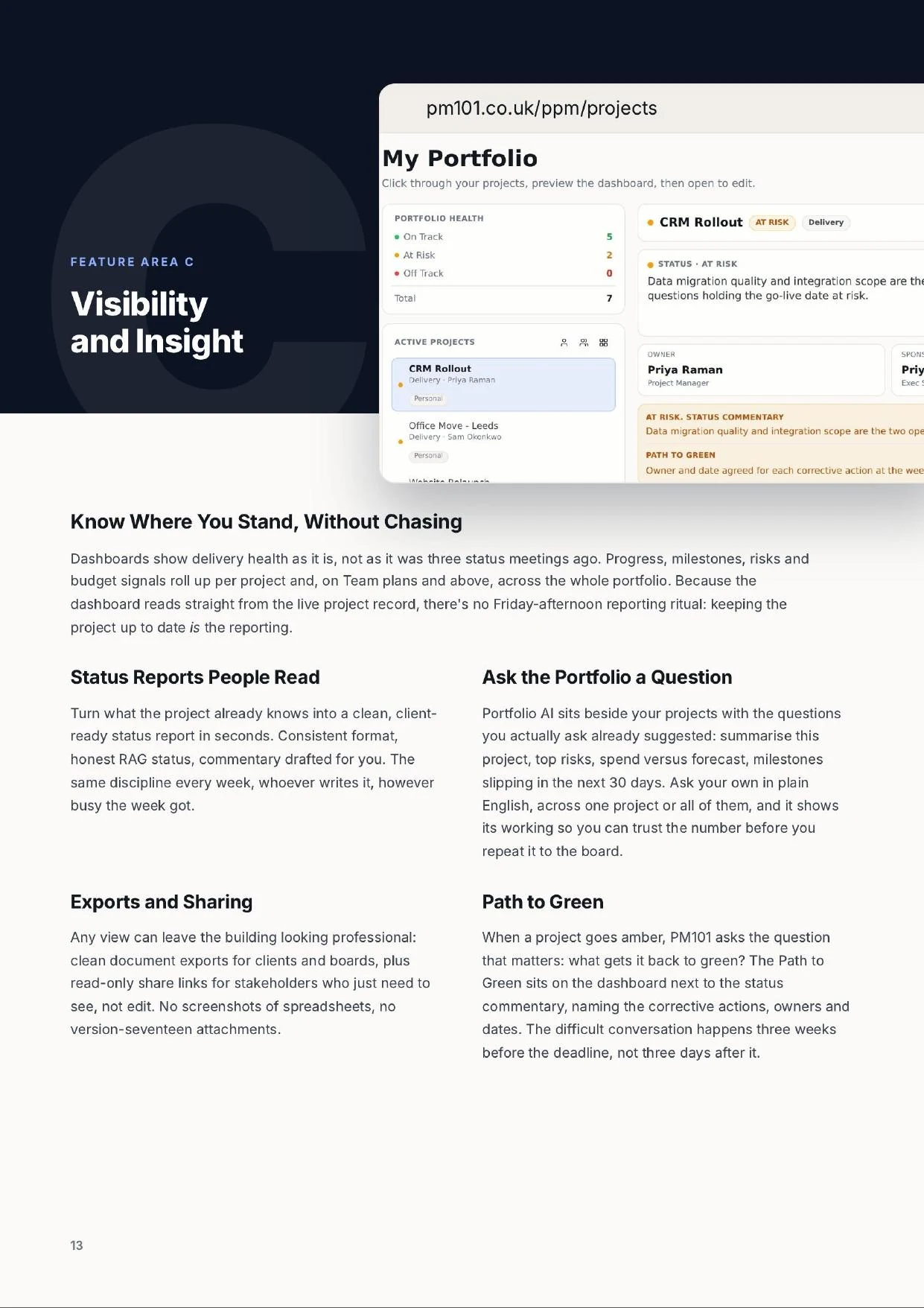
    The PM101 portfolio health panel: counts of projects on track, at risk and off track, an active project list, and a portfolio AI question box.
    Portfolio health and the active project list, with portfolio-wide AI beneath it.

    Dashboards show delivery health as it is, not as it was three status meetings ago. Progress, milestones, risks and budget signals roll up per project and, on Team plans and above, across the whole portfolio. Because the dashboard reads straight from the live project record, there's no Friday-afternoon reporting ritual: keeping the project up to date is the reporting.

    No screenshots of spreadsheets, no version-seventeen attachments. Problems surface weeks before the deadline, not three days after it.

    Feature area D

    Collaboration and community

    One workspace, one way of working

    On Team plans, projects live in a shared workspace: invite collaborators, share the portfolio view, and apply one set of company standards to everyone's work. Role-based access keeps the right people editing and everyone else informed. New starters inherit the house way of running projects on day one, because it's built into the tools they pick up, not a handbook they'll never read.

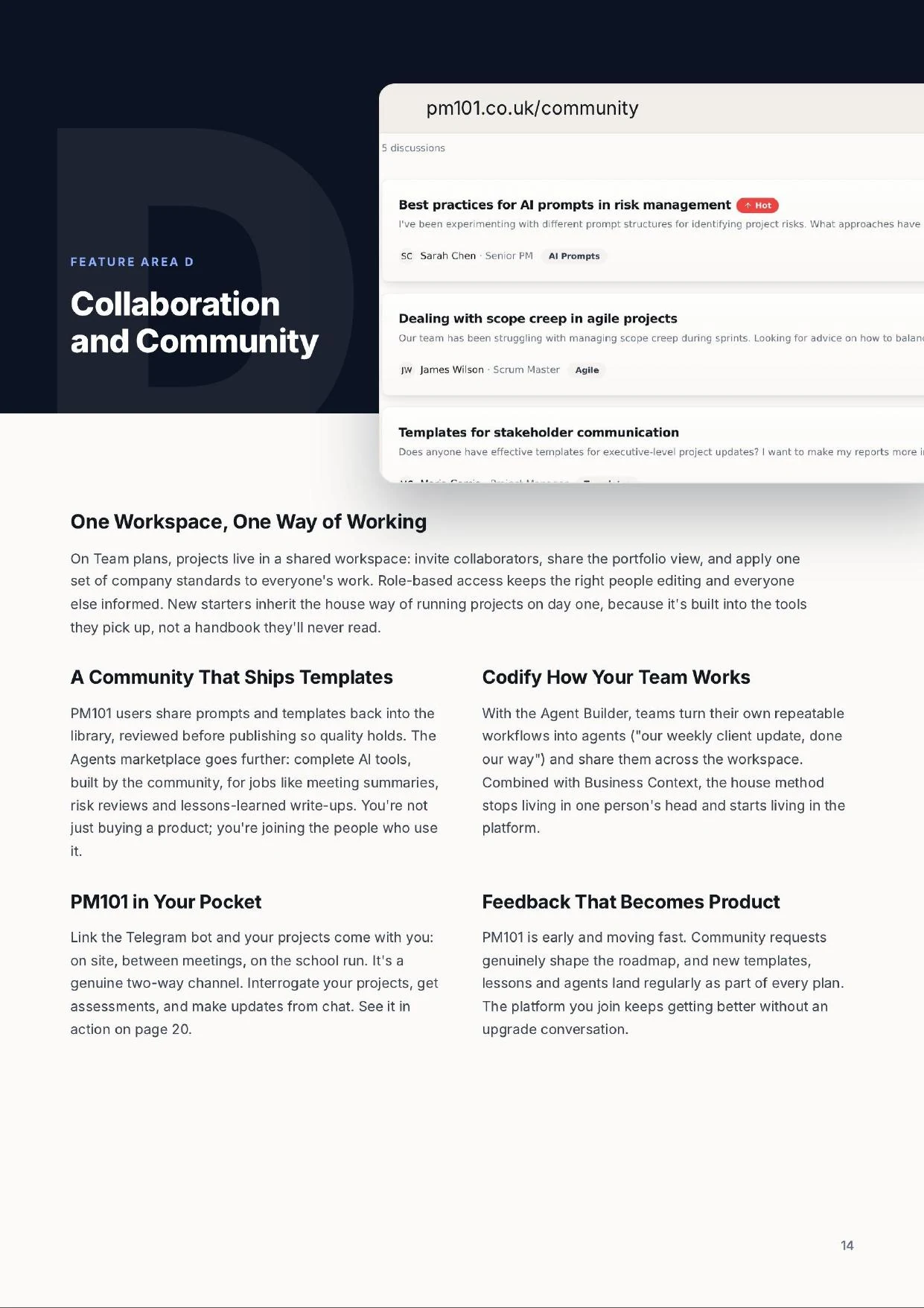
    A community that ships templates

    PM101 users share prompts and templates back into the library, reviewed before publishing so quality holds. The Agents marketplace goes further: complete AI tools, built by the community, for jobs like meeting summaries, risk reviews and lessons-learned write-ups. You're not just buying a product; you're joining the people who use it.

    Codify how your team works

    With the Agent Builder, teams turn their own repeatable workflows into agents ("our weekly client update, done our way") and share them across the workspace. Combined with Business Context, the house method stops living in one person's head and starts living in the platform.

    PM101 in your pocket

    Link the Telegram bot and your projects come with you: on site, between meetings, on the school run. It's a genuine two-way channel. Interrogate your projects, get assessments, and make updates from chat.

    Feedback that becomes product

    PM101 is early and moving fast. Community requests genuinely shape the roadmap, and new templates, lessons and agents land regularly as part of every plan. The platform you join keeps getting better without an upgrade conversation.

    03

    AI

    Anyone can paste a question into a chatbot. The difference with PM101 is what's behind the answer: the Context Engine, drawing on practitioner-written practice, your live project data, and the way your business actually works.

    It starts with an assistant that talks your language, and it gets dramatic when you hand it a document and click Generate.

    The PM Assistant

    Ask the exact question you're stuck on. Plain-English question in, grounded answer out: not a search engine, not a generic chatbot, but an assistant wired into the PM101 library and your own projects.

    Answers and advice

    From "what goes in a project charter?" to "my sponsor keeps skipping our check-ins, what do I do?" Practical, situation-aware guidance, like a mentor on tap who's seen it all before, and honest when it doesn't know.

    Drafting and doing

    Charters, status reports, risk logs, stakeholder comms: drafted from what your project already knows, in your house format once you've taught it one. Question to finished document, in one run.

    The assistant is everywhere you work: the search bar on every page of the platform, draft buttons inside the Project Plan Manager, and the Telegram bot when you're away from a desk. Free accounts get a monthly allowance; Pro and above are unlimited. And because the PM expertise is in the prompts, you get useful results first time, without learning to "prompt engineer".

    Where the time comes back

    One click to a governance foundation

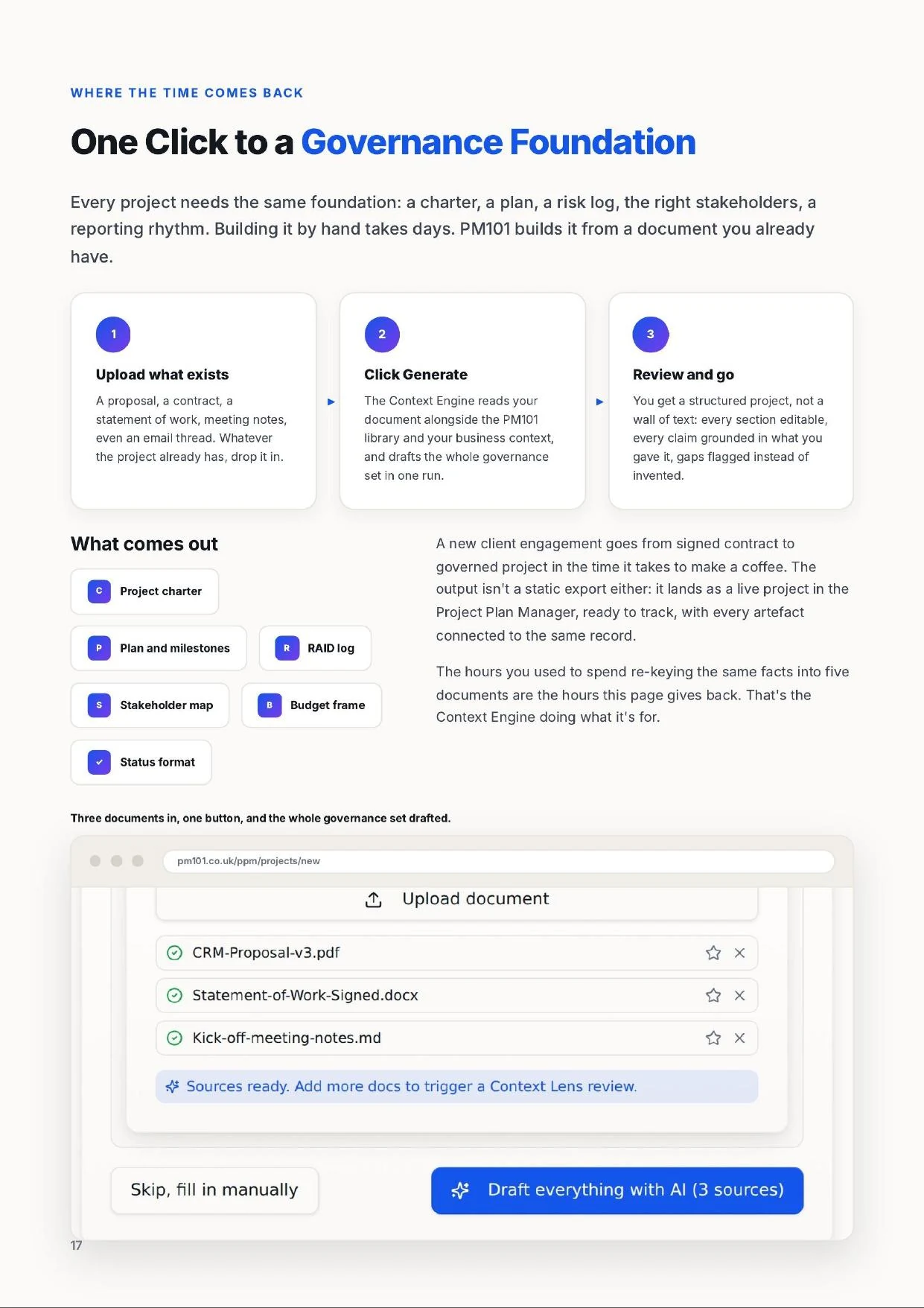
    Every project needs the same foundation: a charter, a plan, a risk log, the right stakeholders, a reporting rhythm. Building it by hand takes days. PM101 builds it from a document you already have.

    1. 1

      Upload what exists

      A proposal, a contract, a statement of work, meeting notes, even an email thread. Whatever the project already has, drop it in.

    2. 2

      Click Generate

      The Context Engine reads your document alongside the PM101 library and your business context, and drafts the whole governance set in one run.

    3. 3

      Review and go

      A structured project, not a wall of text: every section editable, every claim grounded in what you gave it, gaps flagged instead of invented.

    What comes out

    Project charterPlan and milestonesRAID logStakeholder mapBudget frameStatus format

    A new client engagement goes from signed contract to governed project in the time it takes to make a coffee. The output isn't a static export either: it lands as a live project in the Project Plan Manager, ready to track, with every artefact connected to the same record.

    The hours you used to spend re-keying the same facts into five documents are the hours this page gives back. That's the Context Engine doing what it's for.

    The Generate a template panel inside a PM101 project: a library search box and a Generate button.
    Generate: describe what you need and PM101 fills the best-fit template with your project context.

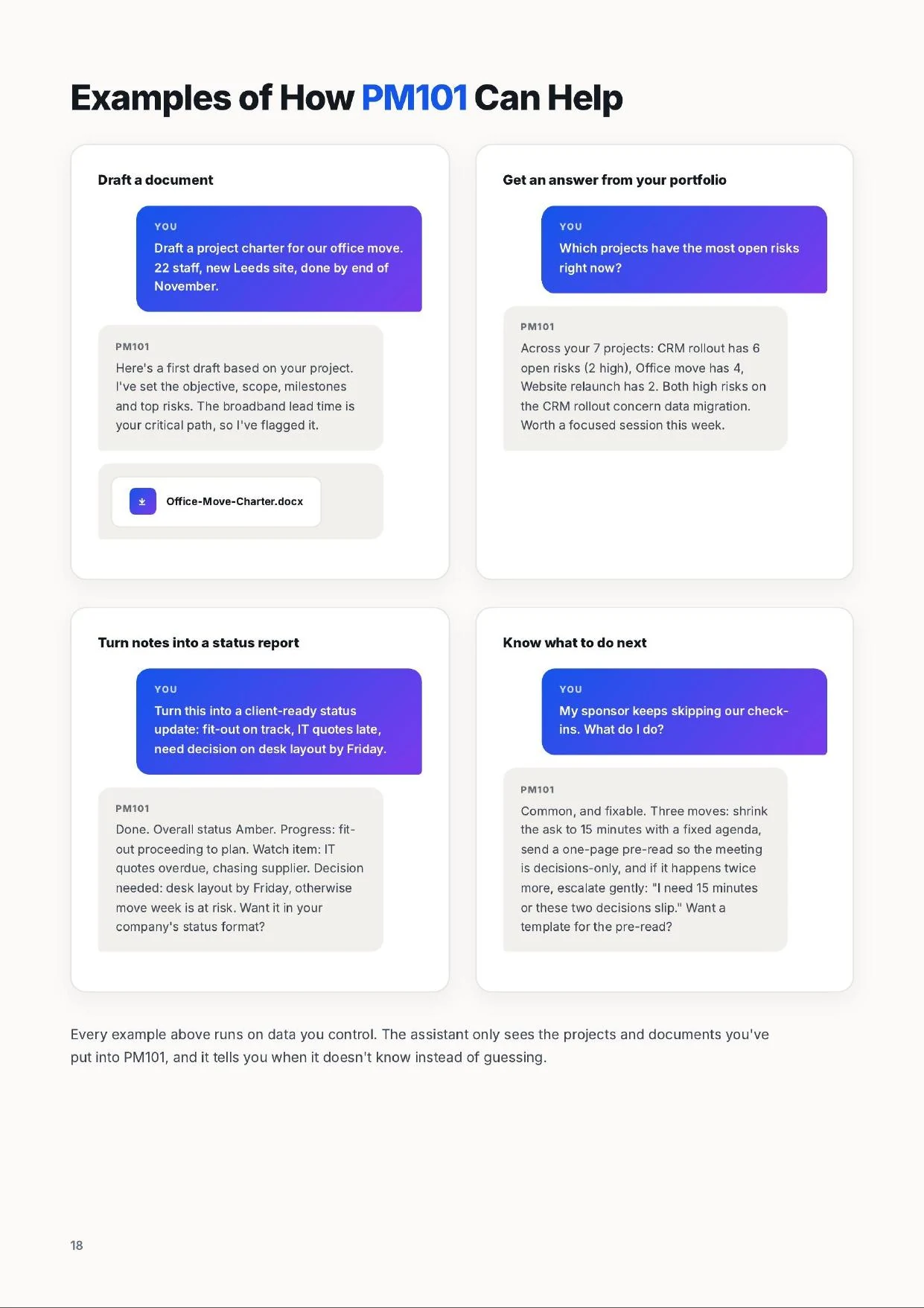
    Examples of how PM101 can help

    Draft a document

    You

    Draft a project charter for our office move. 22 staff, new Leeds site, done by end of November.

    PM101

    Here's a first draft based on your project. I've set the objective, scope, milestones and top risks. The broadband lead time is your critical path, so I've flagged it.

    Office-Move-Charter.docx

    Get an answer from your portfolio

    You

    Which projects have the most open risks right now?

    PM101

    Across your 7 projects: CRM rollout has 6 open risks (2 high), Office move has 4, Website relaunch has 2. Both high risks on the CRM rollout concern data migration. Worth a focused session this week.

    Turn notes into a status report

    You

    Turn this into a client-ready status update: fit-out on track, IT quotes late, need decision on desk layout by Friday.

    PM101

    Done. Overall status Amber. Progress: fit-out proceeding to plan. Watch item: IT quotes overdue, chasing supplier. Decision needed: desk layout by Friday, otherwise move week is at risk. Want it in your company's status format?

    Know what to do next

    You

    My sponsor keeps skipping our check-ins. What do I do?

    PM101

    Common, and fixable. Three moves: shrink the ask to 15 minutes with a fixed agenda, send a one-page pre-read so the meeting is decisions-only, and if it happens twice more, escalate gently: "I need 15 minutes or these two decisions slip." Want a template for the pre-read?

    Every example above runs on data you control. The assistant only sees the projects and documents you've put into PM101, and it tells you when it doesn't know instead of guessing.

    Pro and above

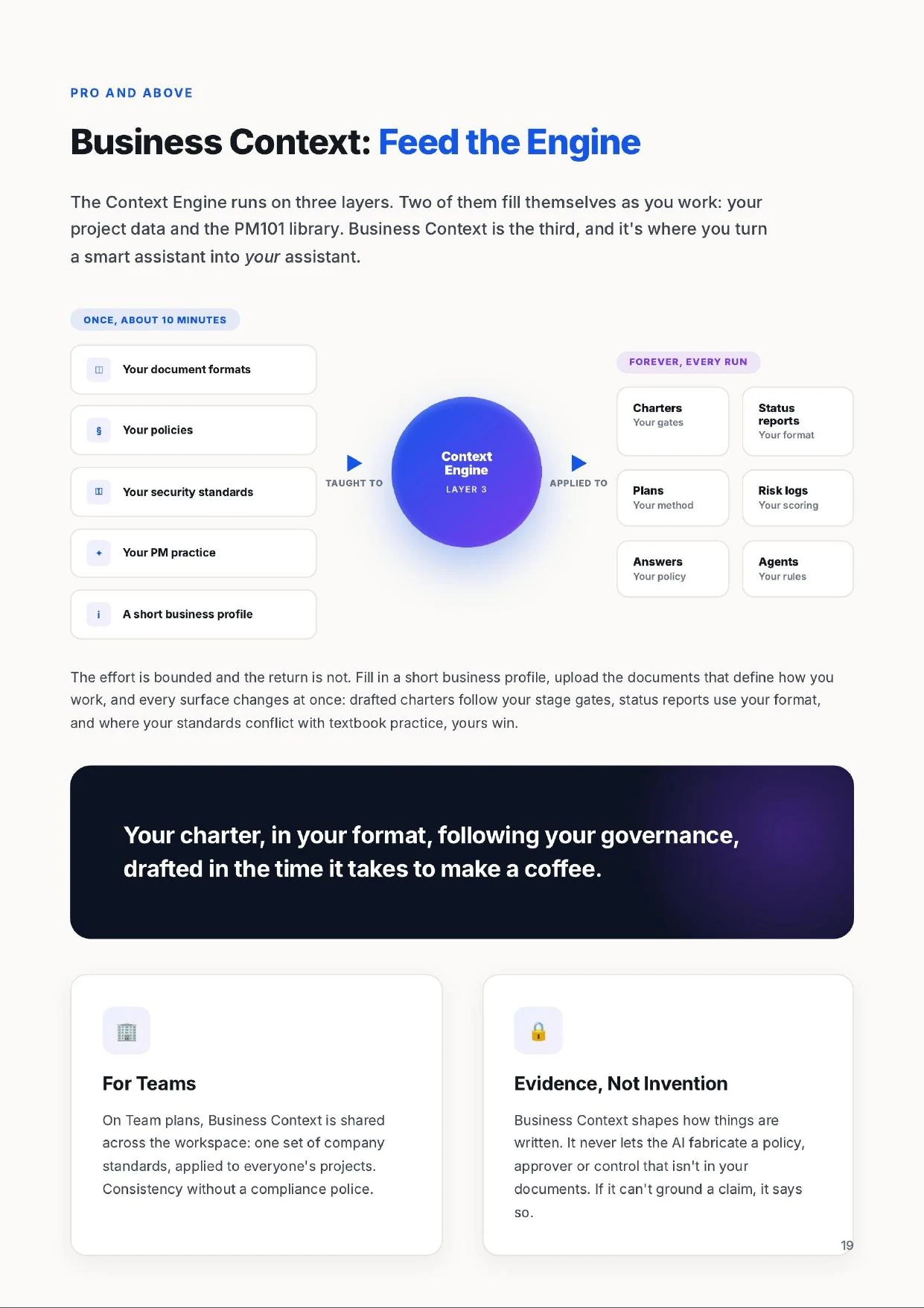
    Business Context: feed the engine

    The Context Engine runs on three layers. Two of them fill themselves as you work: your project data and the PM101 library. Business Context is the third, and it's where you turn a smart assistant into your assistant.

    Teach it once

    Fill in a short business profile: company, industry, methodology, governance, tone of voice. Then upload the documents that define how you work, in four categories: your own document formats, your policies, your security standards, and your PM practice.

    It applies everywhere

    Drafted charters follow your stage gates. Status reports use your format; when your template fits, PM101 prefers it over its own. Portfolio answers respect your policies. Where your standards conflict with textbook practice, yours win.

    Your charter, in your format, following your governance, drafted in the time it takes to make a coffee.

    For teams

    On Team plans, Business Context is shared across the workspace: one set of company standards, applied to everyone's projects. Consistency without a compliance police.

    Evidence, not invention

    Business Context shapes how things are written. It never lets the AI fabricate a policy, approver or control that isn't in your documents. If it can't ground a claim, it says so.

    All plans · unlimited on Pro

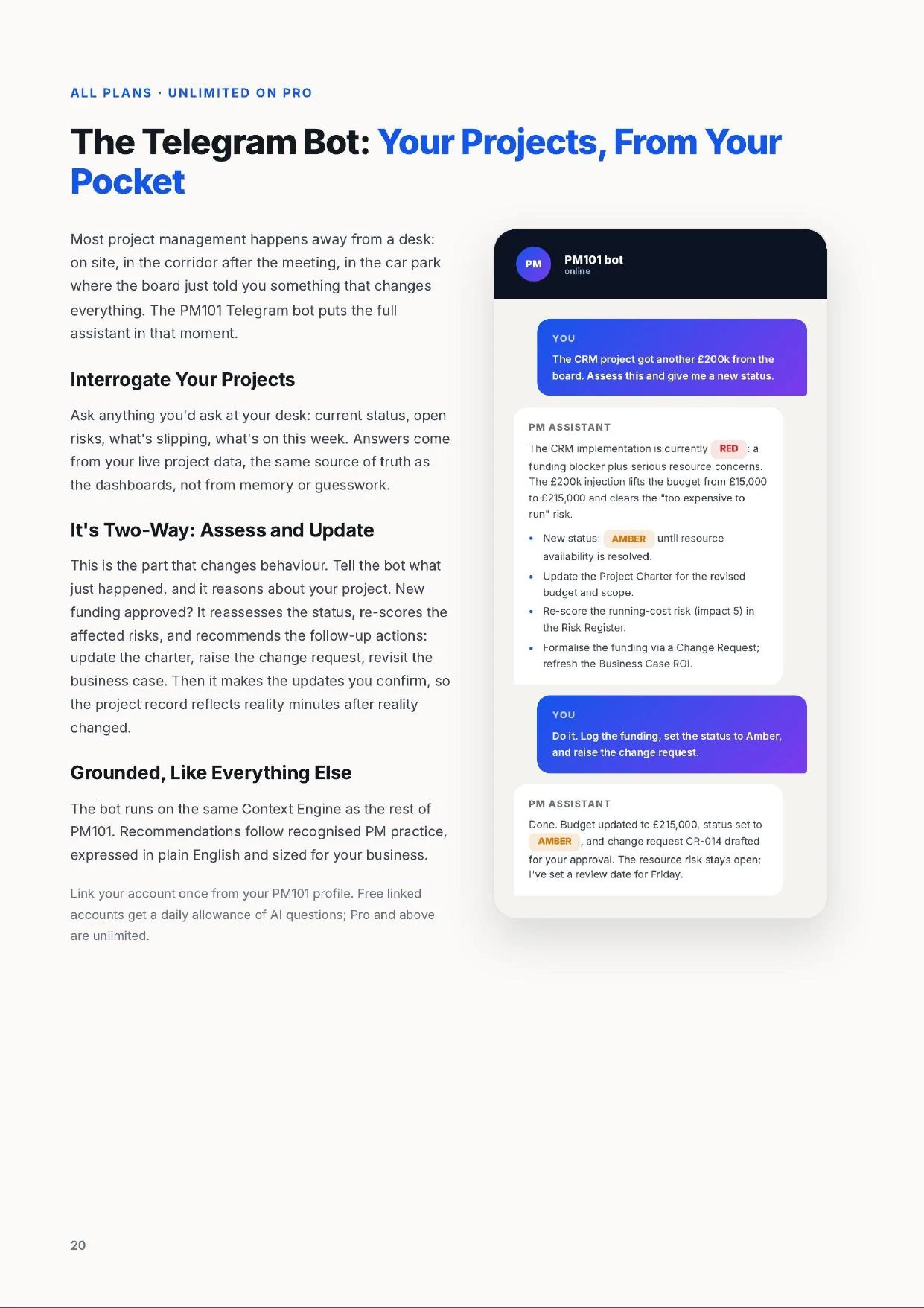
    The Telegram bot: your projects, from your pocket

    Most project management happens away from a desk: on site, in the corridor after the meeting, in the car park where the board just told you something that changes everything. The PM101 Telegram bot puts the full assistant in that moment.

    Interrogate your projects

    Ask anything you'd ask at your desk: current status, open risks, what's slipping, what's on this week. Answers come from your live project data, the same source of truth as the dashboards, not from memory or guesswork.

    It's two-way: assess and update

    This is the part that changes behaviour. Tell the bot what just happened, and it reasons about your project. New funding approved? It reassesses the status, re-scores the affected risks, and recommends the follow-up actions: update the charter, raise the change request, revisit the business case. Then it makes the updates you confirm, so the project record reflects reality minutes after reality changed.

    Grounded, like everything else

    The bot runs on the same Context Engine as the rest of PM101. Recommendations follow recognised PM practice, expressed in plain English and sized for your business. Link your account once from your PM101 profile. Free linked accounts get a daily allowance of AI questions; Pro and above are unlimited.

    PM101 bot · online

    You

    The CRM project got another £200k from the board. Assess this and give me a new status.

    PM101

    The CRM implementation is currently RED: a funding blocker plus serious resource concerns. The £200k injection lifts the budget from £15,000 to £215,000 and clears the "too expensive to run" risk.

    • New status: AMBER until resource availability is resolved.
    • Update the Project Charter for the revised budget and scope.
    • Re-score the running-cost risk (impact 5) in the Risk Register.
    • Formalise the funding via a Change Request; refresh the Business Case ROI.

    You

    Do it. Log the funding, set the status to Amber, and raise the change request.

    PM101

    Done. Budget updated to £215,000, status set to AMBER, and change request CR-014 drafted for your approval. The resource risk stays open; I've set a review date for Friday.

    04

    The Platform

    No two accidental project managers have the same week. Some need a template by Thursday; some need to convince a board; some need to run twelve client projects without dropping one.

    PM101 is built as a set of connected tools. Use one, use them all: they get better together, because they share the same Context Engine.

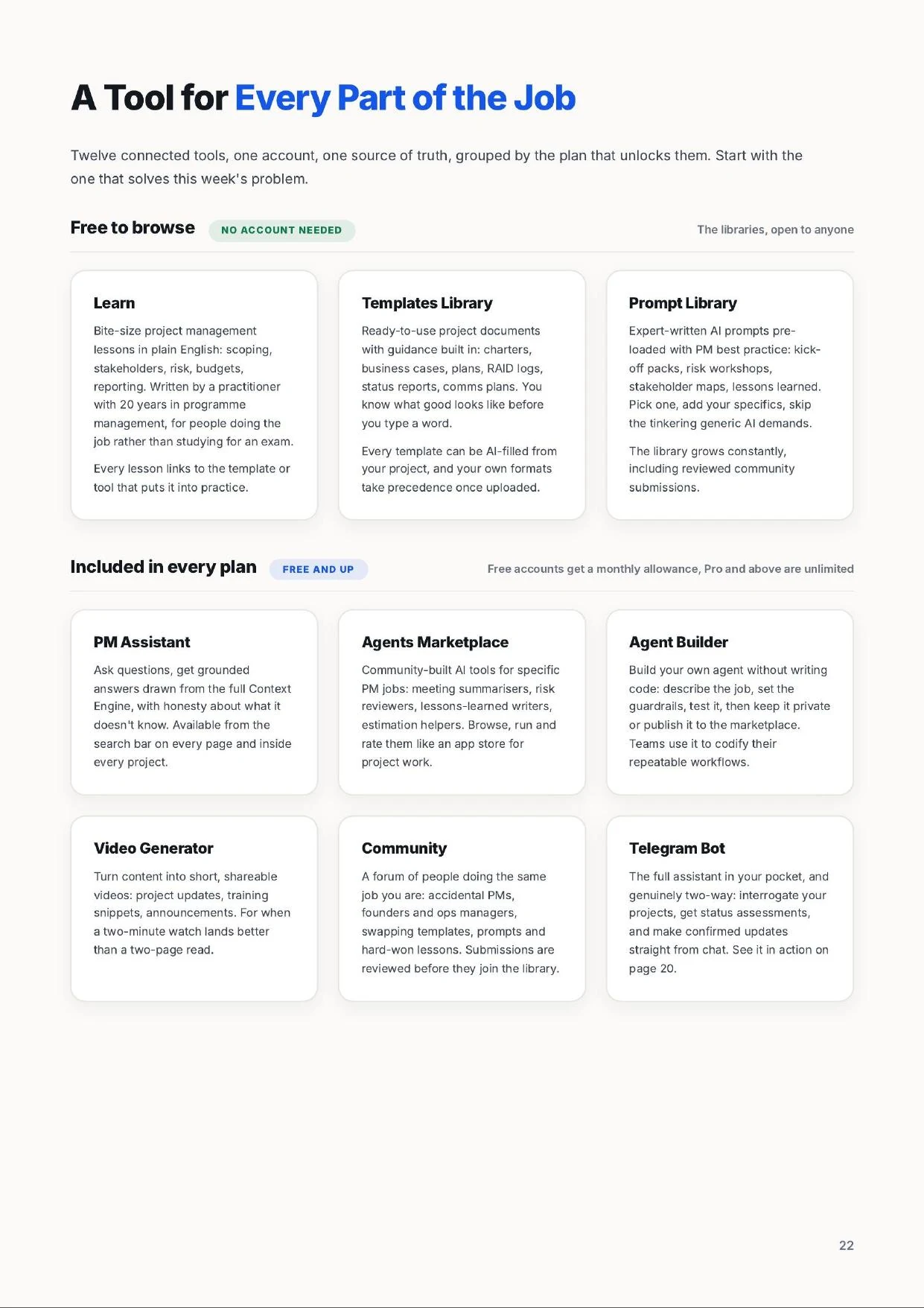
    A tool for every part of the job

    Twelve connected tools, one account, one source of truth. Start with the one that solves this week's problem.

    Learn

    Free to browse

    Bite-size project management lessons in plain English: scoping, stakeholders, risk, budgets, reporting. Written by a practitioner with 20 years in programme management, for people doing the job rather than studying for an exam.

    Every lesson links to the template or tool that puts it into practice.

    Templates Library

    Free to browse

    Ready-to-use project documents with guidance built in: charters, business cases, plans, RAID logs, status reports, comms plans. You know what good looks like before you type a word.

    Every template can be AI-filled from your project's information, and your company's own formats take precedence once uploaded.

    Prompt Library

    Free to browse

    Expert-written AI prompts pre-loaded with PM best practice: kick-off packs, risk workshops, stakeholder maps, lessons learned. Pick one, add your specifics, get a useful result without the tinkering generic AI demands.

    The library grows constantly, including reviewed community submissions.

    PM Assistant

    All plans

    Ask questions, get grounded answers drawn from the full Context Engine, with honesty about what it doesn't know.

    Free accounts include a monthly allowance; Pro and above are unlimited. Also on Telegram, so help is wherever you are.

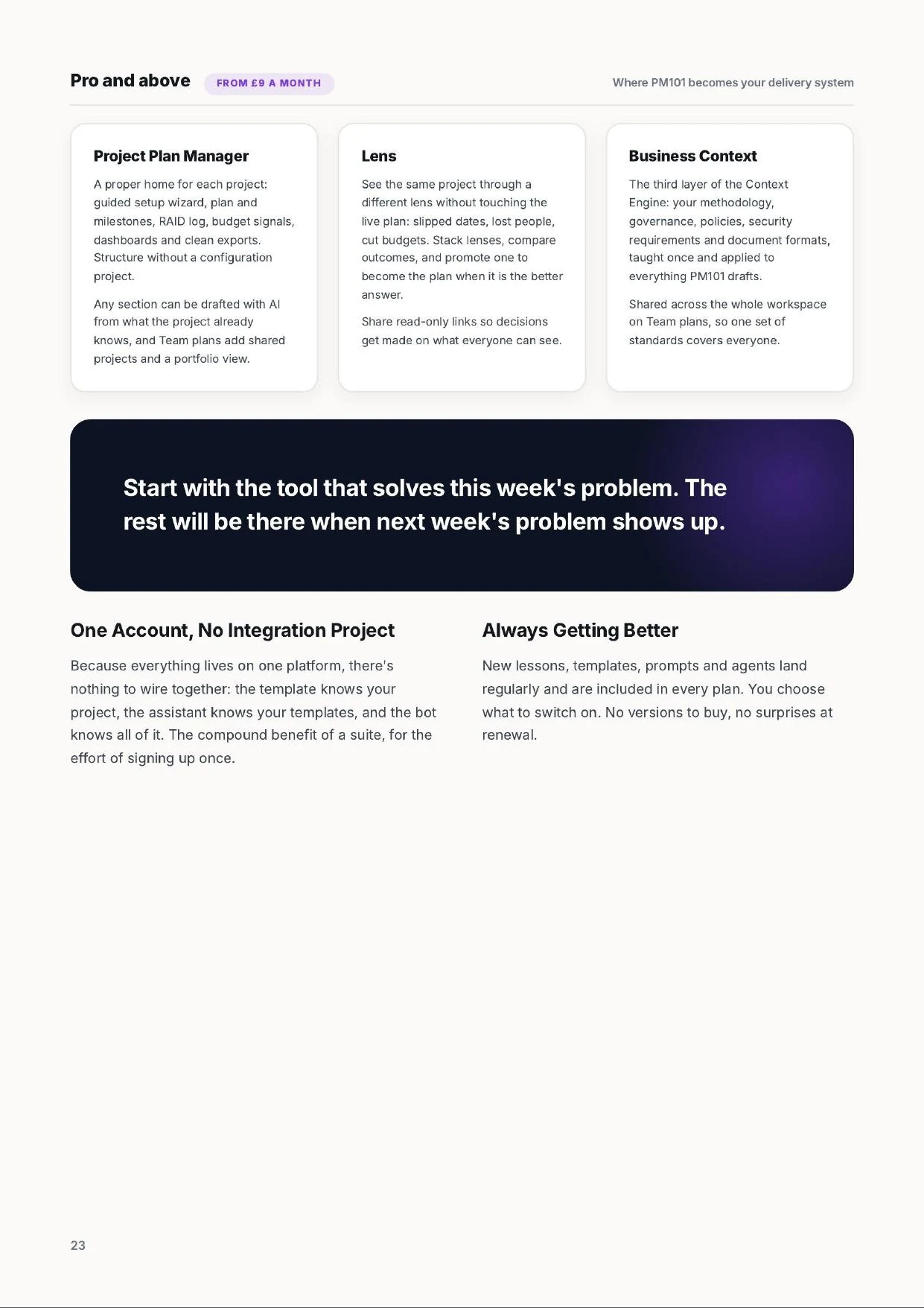
    Project Plan Manager

    Pro

    A proper home for each project: guided setup wizard, plan and milestones, RAID log, budget signals, dashboards and clean exports. Structure without a configuration project.

    Any section can be drafted with AI; Team plans add shared projects and a portfolio view.

    Scenarios

    Pro

    Test "what if" against your plan without touching the live project: slipped dates, lost people, cut budgets. Stack lenses, compare outcomes, and promote a scenario when it's the better answer.

    Share read-only scenario links so decisions get made on what everyone can see.

    Agents Marketplace

    All plans

    Community-built AI tools for specific PM jobs: meeting summarisers, risk reviewers, lessons-learned writers, estimation helpers. Browse, run and rate them like an app store for project work.

    Every agent runs inside PM101, under the same controls as everything else.

    Agent Builder

    All plans

    Build your own agent without writing code: describe the job, set the guardrails, test it, keep it private or publish it to the marketplace.

    Teams use it to codify their repeatable workflows and share them across the workspace.

    Video Generator

    All plans

    Turn content into short, shareable videos: project updates, training snippets, announcements. For when a two-minute watch lands better than a two-page read.

    Free accounts get one generation a month; Pro and above are unlimited.

    Business Context

    Pro

    The third layer of the Context Engine: your methodology, governance, policies, security requirements and document formats, taught once and applied to everything PM101 drafts.

    Shared across the whole workspace on Team plans.

    Community

    All plans

    A forum of people doing the same job you are: accidental PMs, founders, ops managers, swapping templates, prompts and hard-won lessons.

    Submissions are reviewed before they join the library, so quality holds.

    Telegram Bot

    All plans

    The full assistant in your pocket, and genuinely two-way: interrogate your projects, get status assessments, and make confirmed updates straight from chat.

    The project record reflects reality minutes after reality changes.

    Start with the tool that solves this week's problem. The rest will be there when next week's problem shows up.

    One account, no integration project

    Because everything lives on one platform, there's nothing to wire together: the template knows your project, the assistant knows your templates, and the bot knows all of it. The compound benefit of a suite, for the effort of signing up once.

    Always getting better

    New lessons, templates, prompts and agents land regularly and are included in every plan. You choose what to switch on. No versions to buy, no surprises at renewal.

    Ready to run your projects properly?

    PM101 helps small teams move from winging it to running it, and the people already making that shift are seeing the difference.

    Start free: browse the libraries, try the assistant, run your first prompt. Upgrade to Pro for £9 a month when you're ready to manage real projects on the platform, and give the Context Engine something to work with.

    © PM101 · pm101.co.uk · For every PM. Accidental or not.